Sunday, February 25, 2018

There was error retrieving file shares on a Windows 2012 R2 cluster

Good day All,

Welcome back!!!

Recently we had a urgent request to remove a 16 TB drive and after removing it from cluster we started to see the below error.

Following steps was performed:

1. Stopped all the shares which are part of sharing
2. Removed the disk from File share role and moved to available disk
3.Unassigned the drive letter and removed it from cluster
4. Asked Storage team to reclaim the disk and it all went fine.


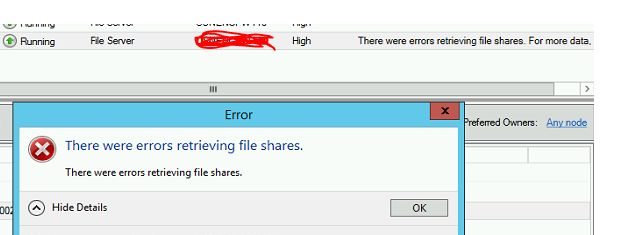
When we logged to failover cluster then this error was showing up and then we got to Server Manager we unable to load volumes or shares.

Following errors was observed:


MS blog site was pointing to check if Winrm is all working fine or not and check the logs on it

1. Winrm qucikconfig
Winrm is already running
winrm is already set

2. winrm id -r:Server name

i saw below output but when i run the same command on the working server i got this output

So i realized that there is something wrong with Winrm not able to communicate.


https://blogs.technet.microsoft.com/askcore/2015/11/23/errors-retrieving-file-shares-on-windows-failover-cluster/
https://lokna.no/?p=1531

About article goes over different Winrm issues fixes but the logs refer to HTTP and if you see my event log it is  not pointing to HTTP at all


Solution:

When i ran the below command found that it was pointing to a decomm proxy server name
netsh winhttp show proxy

So went ahead and run the below command to reset the proxy and removed the proxy
netsh winhttp reset proxy

closed the Server Manager and re-opened and it all was working fine.
To be true even though this fixed the issue i am still not clear how a working Server when a disk was removed this error showed up and removing proxy was the fix is not something corilating
If anyone can figure out then please let me know..
Hopefully this helps someone until next one you all have good day!!!!!!!!!!!!!!!!!!!!!!!!!!!!!!!!!!!

Wednesday, January 3, 2018

FTP log in CSV Format

Good day All,

Welcome back and Happy New year to All!!!!!!!!!!!!!!!!!!!

We had requirement to convert FTP logs to a CSV format and to merge then month wise if possible,
Below are the steps i followed.

1. I already had logparser.exe installed on  my desktop so incase you dont have just download and install it a very useful log verifying tool.
2. In power shell ISE i changed the path to C:\Program Files (x86)\Log Parser 2.2

$logFilePath="D:\\FTPLogs\"

foreach ($File in (Get-ChildItem $logFilePath))
{
.\logparser.exe -i:W3C -o:csv "SELECT * INTO D:\FTPLogs\$File.csv FROM D:\FTPLogs\$File"
}

3. I converted all the log files to subsequent CSV files..

4. Copied the month wise CSV files and merged then as below

$files = Get-ChildItem D:\FTPLogs\*.csv
Get-Content $files | Set-Content D:\FTPLogs\MergedCsvFile.csv


There may be Powershell guru's who could do it a better way if so please share it to all.. for layman like me managed to get the required result...

Hopefully this helps someone, Until next one you all have good day!!!!!!!!!!!!!!!!!!!!!!!!!!!!!!

Wednesday, November 22, 2017

CPU 95% spike alert - resolved!!!!

Good day All,

Welcome back!!!! We had a strange incident for CPU alerts been reported by Client.. our monitoring tool was not showing any high CPU usage but Client as monitoring setup and they are getting CPU spike alerts one or two times in couple of days...

We did routine health check by checking month log CPU usage , CPU was hardly showing 30% spiking for entire month but still Client was getting alert so following steps was performed to further troubelshoot

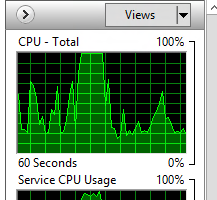
1. Open resource monitor and started to keep a eye on CPU spike to see which Service is causing it..
2. After a close watch for like a hr was able to tell that svchost.exe was utilizing it
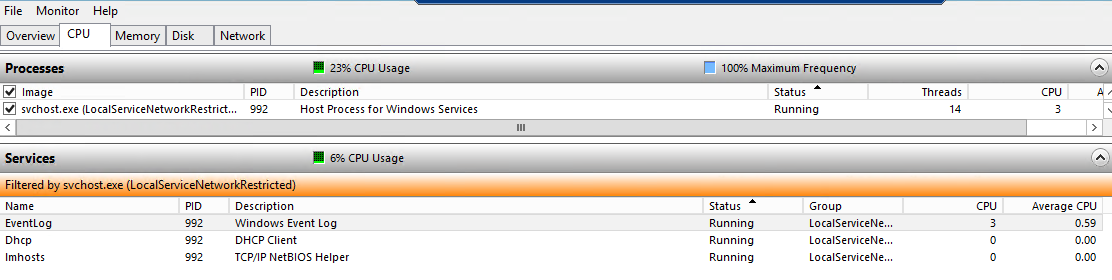
3. As svchost is a shared process had to identity which Service is causing it so enabled the check box next  to Service host in CPU tab of resource montior and monitored as below


4. From the above i was able to identify it was event log Service which is piking the CPU
5.So opened event viewer and started to check the events found that in Security log for every 1 sec at-least 10 to 15 events on Event ID:5156 Platform Filtering Connection was getting generated and filling up the 1 GB security log file in no time. After the log file is filled its trying to over write but number are events are so high its unable to process it and spiking the CPU


6. Verified in local security policy that Audit Object Access policy was enabled for both Success, Failure and it been enforced with GPO.


7. Starting Windows 2008 Audit policy has changed and lot of subcategories are added and you can verify it by typing in command prompt auditpol / get / category


8.Our Security policy was to have both Success and Failure for Filtering Platform Connection, had to raise a exception and policy was changed from Success and Failure to only Failure with the following command on the Server
auditPol /set /Subcategory:"Filtering Platform Connection" /Success:disable /failure:enable

Ola the issue got resolved and we did't see any more spikes....

hopefully this helps someone, until next one you all have a good day!!!!!!!!!!!!!!!!!!!!!!!!!!!!!!!!!!!!!!

Preparing to configure windows - Do not turn off your computer

Good day All,

Welcome back!!! today will share a issue we encountered on a Windows 2008 Server after patching.

After patching when logged into console this is the error we started to see for a very long time


Troubleshooting steps performed

1. rebooted the Server, went to safe mode and try to uninstall installed patches and it showed error and unable to unistall
2.Tried last good configuration that didn't work
3.dism.exe /cleanup-image /scanhealth didnt help

So to fix the issue we reboot the Server and during the above screen did a MMC to check if all Service was running fine or anything is struck in stopping mode.

On verification we found that Antivirus scan was in stopping state , we tried pskill to kill the service but no luck so we changed the service settings to manual and then did a reboot..
Ola we able to login back and then did a windows update, patches got installed and then started the service back..

I have seen across the internet some one saying to remove the pending.xml file under C:\windows\winsxs so just sharing in-case above steps doesn't work for someone.

Hopefully this helps someone, until next one you all have good day!!!!!!!!!!!!!!!!!!!!!!!!!!!!!

Friday, November 17, 2017

Linux Blade after firmware either NIC's disconnected or unable to reboot or power off.

Good day All,

Welcome back!!! recently Unix team started to do firmware upgrade on the blades and after upgrade when to reboot the Servers couple of issues was reported

1. all the NIC cards would be in disconnected state
2. Blade will not respond or will not be able to hard reset or power it off state.

Following steps was performed to fix the issue

1. Reset the blade :

  • Login to OA and make note of the bay the blade is in under. 
  • Now open putty and connect to primary OA IP
  • type reset server bayno. 


ask you to confirm and then it will show successfully done.

2. If resetting the blade fails then login to Virtual connect Manager. Go to profiles and select the blade and click edit.Down below you will see a option to un-assign the profile for the server and click ok.  Now go back to Server and then apply the same profile back and click Apply and power on the blade.

hopefully this helps someone and until next one all have a good day!!!!!!!!!!!!!!!!!!!!!!!!!!!!!!!