Monday, January 28, 2019

Hybrid Cloud Extension - HCX - VMware Admin time to learn

Good day All,


Welcome back!!!!

HCX is been there for quite sometime i believe Vsphere version of 5.x but not till recently this got quite popular with Public cloud migrations and VMware on AWS included it for free.

So the 2 stand our features HCX are


1.Live Migrations\Replications - you can do migrations across different versions of VSphere 5.x to 6.x
2. No need to stretch VLAN's for VMotion, It uses a HCX Gateway and run as a proxy for migrations.


If you see recent case studies there is considerable growth in companies which are  on traditional VMware infrastructure are starting to look into VMware for AWS offering as the Cloud migrations are done with no downtime and most important thing not much of infrastructure changes

If you are one of those guys who would like to try it out then follow the below link VMware provides a free 1.5 hrs session can be extended to 8 hrs to try out all the features.

http://docs.hol.vmware.com/HOL-2019/hol-1981-01-hbd_pdf_en.pdf

https://labs.hol.vmware.com/HOL/catalogs/enrollments/lab/NEE-318377_87_457338

Hopefully this will help someone ,until next one you all have good day!!!!!!!!!!!!!!!!!!!!!!!!


Sunday, January 27, 2019

Amazon announcing outposts

Good day All,

Welcome back!!!!

Amazon recently on 2018  invite announced something called Outposts.
What does it means? if you are some one from MS world and familiar with something called Azure Stack then Outposts is similar .

We have companies pushing for Public cloud but we still have lot of reasons why we don't want to move to public cloud so both Amazon and Microsoft is bringing the public cloud into on-premises with there own hardware, same look and feel like Cloud but all stays in Premises and you ca then easily transition to cloud when you ready.


Amazon with Outposts will have Amazon hardware with VMware VSphere environment with SDDC(Software defined data center inbuilt with ESXi + VCenter + NSX + VSAN)


Highlights listed below;

Amazon own Hardware
Single Management interface for both on Premises and Cloud
On Premises AWS Services
Network resilience
Hardware will be own by AWS and VSphere by VMware so Client responsibility is only for VM
Easily extend from O-Premises to Cloud SDDC on AWS and High Speed Amazon public cloud Services.

All VMware Administrators will need to understand and learn VMware on AWS as lot of Companies with existing VMware infrastructure in On-Premise are looking to explore this option and we may end up supporting both On-premise and Cloud soon.

Until next on all have good day!!!!!!!!!!!!!!!!!!!!!!!!!!!!!!!!!!!!

Thursday, January 24, 2019

PA driving license in Exton - USA

Good day All,

Welcome back!!

Happy New Year to all the users checking my site!!! wanted to start of this year with a off topic of me getting a driving license in PA.

Did search around blogs to see how exactly driving test are done but couldn't get any information so thought to share my experience so that this may help some one.....

I am hoping that you have already done your written exam and booked a slot for the driving test if not you should do that first and PA PENDOT website is excellent with all the information.

Let me start with the day of the driving test.


1. Be on on time and no need to go inside the office.If you look around there should be a place marked for driving test start point. Just on your time go and park in the spot.
2. So you are in the driving seat and next to you should be the car owner.Make sure that he carries Car registration , Car insurance with Car VIN number mentioned properly, Car PA stickers are not expired and original driving license.
3. On time driving inspector will come to you and ask to confirm the address , if any changes required and then need to sign it. Inspector will ask the car owner for all the required documents , he will verify them and ask him to get down and wait in the office.

4. At this point inspector will go to front of your car and ask you do the following things

Switch on lights
switch off lights
right indicator
left indicator
high beam
wipers on and off
ask you to put hazard indicator and you need to wait till he ask you to switch off
will ask you to press horn 1 time

Now inspector will go back of the car and will ask these questions

switch off the hazard indicator
right indicator
left indicator
press break 1 time.

Now he will come next to you and he will buckle up and sit next to you.

5. Will ask you if you have any questions, he none he will ask you start the vehicle and go to parallel parking area.

6. As soon as you start, usually you will see a Stop sign so make sure to stop there and proceed...

7. In the parallel parking bay area while going he asked me to go between 2 cones on the drive way and then asked me to go to the spot to perform parallel parking.


8 So after reaching the parallel parking area you put the car in park mode and wait for inspector to give you instructions

Following are the instructions given to me

a. You can move 3 times front and 3 times back but need to make sure you put the car in the box.

If you hit the curb no need to panic can adjust it.


So Inspector will tell you take your time when you ready position your car for parallel parking and proceed..

Every one as the own process to do it but this is how i did

a. maintained  3 feet distance and parked the car so that my back headlights are in line with the parallel parking cones
b.At this point i put my right indicator , reverse gear and by turning my head back and looking through my right side back door window went back slowly.
c.As soon as i saw the cones in the right side back door corner i rotated my steering wheel all the way to right. Holding it tight started to go slowly backwards by looking at the right side mirror till i reached like 90 degree angle.
d. At about 90 degrees angle or if your driver seat is in line with cones rotate back the car steering wheel make it straight and by looking at right mirror go slowly back.

e. As soon as you able to see the front of the cones and you need to make a guess that you have enough space for front of the car and will not hit the cones.

f. Now turn you steering wheel all the way to left and start going slowly and if you in the box and enough distance in the front just stop the car and put the car in parking mode.

9. Following instructions was given to me at this point by inspector

you can do unlimited front and back but make sure to drive the car without hitting the cones.So when ready he said to proceed.

10. At this point  you put left indicator and start slowly not to hit the cones and proceed...

11. Inspector asked me to proceed though the mall so make sure you following the speed mentioned and also stop signs. Also make sure if any people are trying to cross stop for them and proceed.

12. Asked to take the main road, small 5 mints drive and back to office...

13. At this point if passed will ask you to park the vehicle at the front of the office, will be instructed to hand over the car to owner and follow him inside the office.

14. After you follow him will ask you sit and wait for someone to call you and give a token number.

15. After you get you token number you can proceed to area where you will called to a take a picture and license should be handed over in 2-3 mints.

if you have time day before the test in the evening go to the area, know all the stop signs, test parallel parking that will give you little confidence.


Hopefully this helps someone!!! Until next one you all have a good day!!!!!!!!!!!!!!!!!!!!!!!!!! 

Thursday, November 29, 2018

SysAdmins, do i need to know what is Docker????

Good day All,

Welcome back!!! As sysadmin we have witnessed how Virtualization played a role in Company Infrastructures for last 10-15 yrs.

We have moved away from racks and racks of Servers in datacenter to very few large Servers with Hypervisor running on it with lots and lots of Virtual Machines..

this Picture below we all have seen it right ???????????????  typical Hypervisor model


So we all know advantages in Virtualization so today let's see few of the disadvantages


1. One to One ratio for Applications so more number of Virtual Machines
2. OS license for each Virtual Machines
3.CPU,Memory for these Virtual Machines
4. Storage for each Virtual Machines
5..Administrative cost maintaining the Virtual Machines
6. few more .....

Now let's take a look at the below Picture:


Able to identify the difference???? Let's see if this match with what i tell

1.1 large Server
2. Only Multiple Applications but no Virtual Machine, NO OS.

If you closely look at the above Picture you see blue color boxes they are nothing but Containers ..

Containers run  above the OS Kernel but all Applications run in a box independent of each other, so you don't need Virtual Machines to be provisioned.

For sysadmins we need to think this like a Type 2 Hypervisor, Docker engine will be running on the Operating System which will help to create and run these containers... something like this below..


Naveen ,so containers what's the big deal is this going to be game changer? do i really need to know more about it..

well lets see since this made big from 2013 how did it grow...


more check this URL : https://www.datadoghq.com/docker-adoption/


Big players like Microsoft supports Containers in Windows 2016, VMware already came up with  integration of Containers in the VCenter,..

AWS,Azure has been really pushing containers for Devops in Public cloud..

Hopefully this will help someone to kick start there learning in Docket's
Until next one you all have a good day!!!!!!!!!!!!!!!!!!!!!!!!!!!!!!!!!!!!!!

Monday, November 26, 2018

Server builds in on Premises and how it differs in Cloud

Good day All,

Welcome back!!!

As sysadmins we all must have done lot of Server builds so let's see if have to do the same in cloud how it differs

On Premises Server build Steps:

1. On Premises Architect will understand Application requirement , and work with Business and get a Approval to  Create a new VM
2. Build document from Business which will list out Server Name, Number of CPU, Memory.Number of IP's ,Network Details,Hard disk Specifications, Additional Windows Component request , and all business tools.
3. ITIL Process,
4. As most of the environment would be VMware i am just taking that as example here.As Sysadmins you would check for a template , convert the template to Virtual Machines and configure the Virtual machines as per Build documents and hand it over to Client.


In Cloud everything you do will cost you money and this is  were Architects play a major role.

Still confused lets me explain more.

As sysadmins did you ever think about business requirement like CPU,Memory,Hard disk,IOPS etc.. nope we just followed the build documents but in Cloud you need to pay attention to every bit and pieces of these things and if wrongly provisioned you looking at burning money to company.

Terrified???  In Cloud all these are referred as compute resource and you need to buy with different Server model available.

Still confused let me see if i can explain.. so if you have to build a Server you will have to pick certain Size Virtual machine in market place  which is kind of bundle with OS,Memory, CPU,IOPS of the Hard disk examples as below

General Purpose VM
Compute Optimized VM
Memory Optimized VM
Storage Optimized VM
GPU Optimized VM
High Performance Compute VM


In Cloud Server build Steps:

1. On Premise Architect will have to do a major upgrade to understand Cloud and will have to work with Business , Understand Application requirements and its Compute resource requirement like CPU,Memory,Hard disk,IOPS it required  and  come with Cost optimized Virtual Machine Sizes before getting approval for a VM.
2. Build documents will now have VM Size to pick in Cloud and rest of the details like Server Name, IP details and Install Tools will remain same.
3.ITIL process will be same as On Premises.
4. As sysadmin you will login to Cloud, Pick the VM mentioned in Build document and just do couple of clicks and your VM will be provisioned. Post joining to domain, tools install will be same as you do in on premises.


As a Sysadmins it's not a major learning curve but if you want to be a Cloud Architect then yes a very big learning curve


Hopefully this helps someone, until next one you all have a good day!!!!!!!!!!!!!!!!!!!!!!!!!!


Note: Above steps i mentioned is if Business requirement is for a IAAS offering for VM. If Architects further analyzing the Application may even look at PAAS offering then the whole Build process will change 

Sys Admins and moving to Cloud

Good day All,

Welcome back!!!

We have great Admins worked in data centers with lot of experience but when it comes to cloud i see we are falling behind and still kind of confused where shall i start ? what is required from me to learn cloud? is it even required? so let's see if we can answer the questions


1. As Sysadmin's do we need to know Cloud?

Well i think is a big yes and note not just one Cloud provider you need to get familiar in multi Cloud platforms.You must be saying what Naveen i don't have time to learn one.. cloud is so big and now you telling to learn multiple?

So this is how it unfolds .. Business as we all know on premises we want to do cost cutting and bring in Automation and any cloud provide that can give a better offer is what business will choose and top of the chart right now is Azure, AWS closely followed by Google,Oracle..

2. Second big question is from where should i start my journey to Cloud?

As Sysadmins we know every bit and pieces of things in On Premise just that the same terms in cloud is different so try first correlate the On premises terms and what it means in Cloud should be your first step,
Check mark all the things you are strong in On premise and see how is done in Cloud should be your next steps..

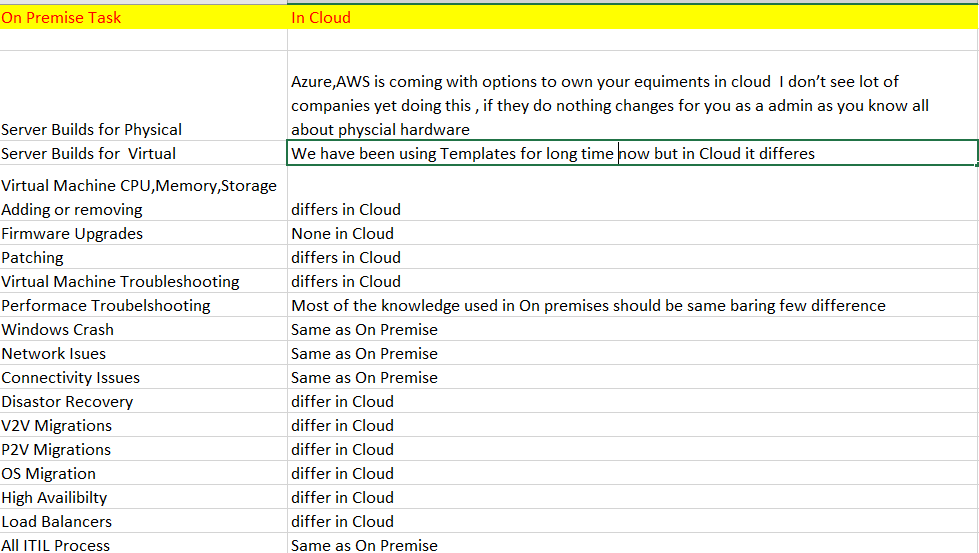
See below i listed few of the task we do


Now from the above list we can check mark the tasks we already know and start understand how it differs in Cloud.

Next article i will post lets take a example of Server build and lets see how it differs in Cloud.

Hopefully this helps sysadmins to kick start there cloud journey ......
Until next one you all have a good day!!!!!!!!!!!!!!!!!!!!!!!!!!!!!!!!!!


Tuesday, November 13, 2018

Cloud Terms for Sysadmins

Good day All,
Welcome back!!!

We as admins sooner or later will have to start supporting cloud and lot of companies when they moving to cloud are looking at mix and match on different cloud providers.

For example when i was talking to a friend in a big company they planning to move most of the Servers to Cloud they had partnered with both Amazon and Azure for IAAS and PAAS Services.
So its important that few terms what we use in On premises to understand what is been called in Cloud. Below listing are only for AWS,Azure which are right now the industry leading Cloud providers.

Any corrections are always welcome and hopefully it will help admins to quickly refer!!!!
Until next one you all have a good day!!!!!!!!!!!!!!!!!!!!!