Thursday, November 29, 2018

SysAdmins, do i need to know what is Docker????

Good day All,

Welcome back!!! As sysadmin we have witnessed how Virtualization played a role in Company Infrastructures for last 10-15 yrs.

We have moved away from racks and racks of Servers in datacenter to very few large Servers with Hypervisor running on it with lots and lots of Virtual Machines..

this Picture below we all have seen it right ???????????????  typical Hypervisor model


So we all know advantages in Virtualization so today let's see few of the disadvantages


1. One to One ratio for Applications so more number of Virtual Machines
2. OS license for each Virtual Machines
3.CPU,Memory for these Virtual Machines
4. Storage for each Virtual Machines
5..Administrative cost maintaining the Virtual Machines
6. few more .....

Now let's take a look at the below Picture:
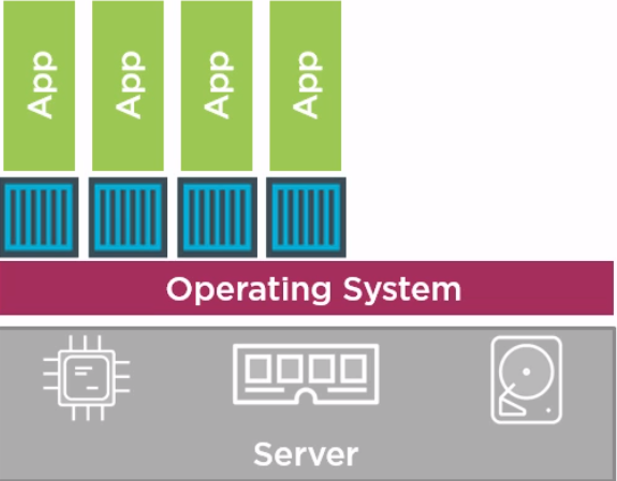


Able to identify the difference???? Let's see if this match with what i tell

1.1 large Server
2. Only Multiple Applications but no Virtual Machine, NO OS.

If you closely look at the above Picture you see blue color boxes they are nothing but Containers ..

Containers run  above the OS Kernel but all Applications run in a box independent of each other, so you don't need Virtual Machines to be provisioned.

For sysadmins we need to think this like a Type 2 Hypervisor, Docker engine will be running on the Operating System which will help to create and run these containers... something like this below..


Naveen ,so containers what's the big deal is this going to be game changer? do i really need to know more about it..

well lets see since this made big from 2013 how did it grow...


more check this URL : https://www.datadoghq.com/docker-adoption/


Big players like Microsoft supports Containers in Windows 2016, VMware already came up with  integration of Containers in the VCenter,..

AWS,Azure has been really pushing containers for Devops in Public cloud..

Hopefully this will help someone to kick start there learning in Docket's
Until next one you all have a good day!!!!!!!!!!!!!!!!!!!!!!!!!!!!!!!!!!!!!!

Monday, November 26, 2018

Server builds in on Premises and how it differs in Cloud

Good day All,

Welcome back!!!

As sysadmins we all must have done lot of Server builds so let's see if have to do the same in cloud how it differs

On Premises Server build Steps:

1. On Premises Architect will understand Application requirement , and work with Business and get a Approval to  Create a new VM
2. Build document from Business which will list out Server Name, Number of CPU, Memory.Number of IP's ,Network Details,Hard disk Specifications, Additional Windows Component request , and all business tools.
3. ITIL Process,
4. As most of the environment would be VMware i am just taking that as example here.As Sysadmins you would check for a template , convert the template to Virtual Machines and configure the Virtual machines as per Build documents and hand it over to Client.


In Cloud everything you do will cost you money and this is  were Architects play a major role.

Still confused lets me explain more.

As sysadmins did you ever think about business requirement like CPU,Memory,Hard disk,IOPS etc.. nope we just followed the build documents but in Cloud you need to pay attention to every bit and pieces of these things and if wrongly provisioned you looking at burning money to company.

Terrified???  In Cloud all these are referred as compute resource and you need to buy with different Server model available.

Still confused let me see if i can explain.. so if you have to build a Server you will have to pick certain Size Virtual machine in market place  which is kind of bundle with OS,Memory, CPU,IOPS of the Hard disk examples as below

General Purpose VM
Compute Optimized VM
Memory Optimized VM
Storage Optimized VM
GPU Optimized VM
High Performance Compute VM


In Cloud Server build Steps:

1. On Premise Architect will have to do a major upgrade to understand Cloud and will have to work with Business , Understand Application requirements and its Compute resource requirement like CPU,Memory,Hard disk,IOPS it required  and  come with Cost optimized Virtual Machine Sizes before getting approval for a VM.
2. Build documents will now have VM Size to pick in Cloud and rest of the details like Server Name, IP details and Install Tools will remain same.
3.ITIL process will be same as On Premises.
4. As sysadmin you will login to Cloud, Pick the VM mentioned in Build document and just do couple of clicks and your VM will be provisioned. Post joining to domain, tools install will be same as you do in on premises.


As a Sysadmins it's not a major learning curve but if you want to be a Cloud Architect then yes a very big learning curve


Hopefully this helps someone, until next one you all have a good day!!!!!!!!!!!!!!!!!!!!!!!!!!


Note: Above steps i mentioned is if Business requirement is for a IAAS offering for VM. If Architects further analyzing the Application may even look at PAAS offering then the whole Build process will change 

Sys Admins and moving to Cloud

Good day All,

Welcome back!!!

We have great Admins worked in data centers with lot of experience but when it comes to cloud i see we are falling behind and still kind of confused where shall i start ? what is required from me to learn cloud? is it even required? so let's see if we can answer the questions


1. As Sysadmin's do we need to know Cloud?

Well i think is a big yes and note not just one Cloud provider you need to get familiar in multi Cloud platforms.You must be saying what Naveen i don't have time to learn one.. cloud is so big and now you telling to learn multiple?

So this is how it unfolds .. Business as we all know on premises we want to do cost cutting and bring in Automation and any cloud provide that can give a better offer is what business will choose and top of the chart right now is Azure, AWS closely followed by Google,Oracle..

2. Second big question is from where should i start my journey to Cloud?

As Sysadmins we know every bit and pieces of things in On Premise just that the same terms in cloud is different so try first correlate the On premises terms and what it means in Cloud should be your first step,
Check mark all the things you are strong in On premise and see how is done in Cloud should be your next steps..

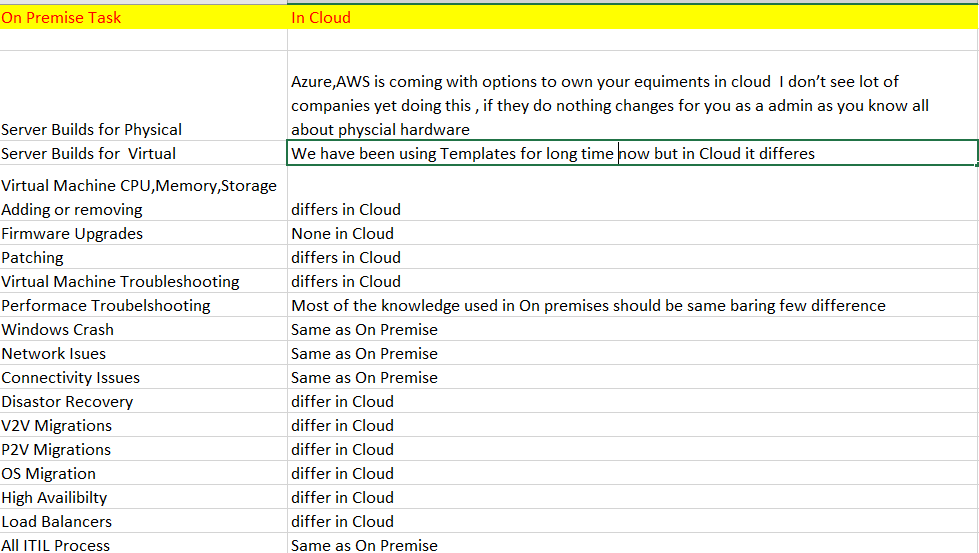
See below i listed few of the task we do


Now from the above list we can check mark the tasks we already know and start understand how it differs in Cloud.

Next article i will post lets take a example of Server build and lets see how it differs in Cloud.

Hopefully this helps sysadmins to kick start there cloud journey ......
Until next one you all have a good day!!!!!!!!!!!!!!!!!!!!!!!!!!!!!!!!!!


Tuesday, November 13, 2018

Cloud Terms for Sysadmins

Good day All,
Welcome back!!!

We as admins sooner or later will have to start supporting cloud and lot of companies when they moving to cloud are looking at mix and match on different cloud providers.

For example when i was talking to a friend in a big company they planning to move most of the Servers to Cloud they had partnered with both Amazon and Azure for IAAS and PAAS Services.
So its important that few terms what we use in On premises to understand what is been called in Cloud. Below listing are only for AWS,Azure which are right now the industry leading Cloud providers.

Any corrections are always welcome and hopefully it will help admins to quickly refer!!!!
Until next one you all have a good day!!!!!!!!!!!!!!!!!!!!!


Wednesday, October 31, 2018

Migrating_Upgrading Physical Vcenter 5.5 to Virtual Vcenter 6.5

Good day All,

Welcome back!!!!

Recently we had a very hot request to upgrade VC from 5.5 U3 to 6.5 to support HP Gen 10 Blades in the farm as they dont support 5.5 U3.

As our VC was on a blade Windows 2008 R2 with SQL 2008 R2 we had to do some planning to get this accomplished.. so below are the steps we did..

Pre steps :

1. SQL Database backup
2. Full Server backup
3. Created a Windows 2012 R2 Server with same name kept it as workgroup Server in case P2V fails.


Note: We tried to do P2V but for some reason the P2V would fail at 95% and final sync didn't get completed, so we had a Backup plan and we went with it...

Steps performed during the cutover:

1, Unjoined the physical Server and it was power down.
2. New Virtual Machine with same name was added back to domain.
3. SQL 2008 R2 SP1 was installed
4.VC 5.5 U3 was installed
5. Validated VC was online and able to access
6.Took a snapshot and restored the SQL database backup we took from Physical Server.
7.Server was rebooted and then all the Service came back clean,
8.Connected to Server and all the existing Permissions,  Standard Switches,Distributed Switches, VLANs was all in tact.
9.After confirming everything as expected snapshot was deleted
10. As SQL 2008 was old the requirement got little changed and the request was to upgrade SQL to 2014, so we upgrade the SQL 2008R2 SP1, applied Sp2 and then upgraded to SQL 2014 as inplace upgrade.

11. Validated everything was intact and at this point took a snapshot before we proceeding to VC 6.5

12. VC was upgraded from 5.5 to 6.5 and everything was tested out.

13. Last step was to upgrade the Vc license file from 5.5 to 6.5 and apply it on the Server.

So must be wondering no issues at all ???  well any upgrades there will be suprises and below are few we had

1. Auto deploy 5.1 was registered and we had to unregister it..so follow the VMware KB 2041183
2.We had HPDP GRE plugin and we had error saying it will not be upgraded and new to reinstall
3.Last big surprise was we lost all the permissions and roles other things like Standard switches,Distributed switches, VLANS was intact.
So solution was to restore dbo.vpx_access as per the KB 2086548

this pretty much covers the steps, hopefully this helps someone and until next one you all have good day!!!!!!!!!!!!!!!!!!!!!!!!!!!!!!!!!!!!

Thursday, September 20, 2018

Windows 2012 showing formatted SAN disk as RAW Volumes

Good day All,

Welcome back!!!

Recently we build a new physical Gen 10 Server with Windows 2012 R2 and it was provisioned with couple of 2 TB of LUN's formatted as NTFS

As part of the build steps we completed all the Tools installation and as the Physical Server was a HP Server and our Firmware\Drivers Standard  is always N-1 we applied the March SPP.

Server was rebooted and handover to client for SQL Install.

When client started to install SQL he realized that couldn't access the LUN's and asked us to verify it.

So when we checked we saw couple of LUN's was showing RAW and couple was showing just fine as GPT NTFS formatted disk.

This became a puzzle and we reached out to SAN team and they confirmed that SAN LUN's are properly formatted and they don't see any issues.

At this point we thought may be there is some issue with the OS install so started to redo the OS intall and performed the whole 9 yard.

One thing we noticed is that OS was installed , wew verified LUN's it was all showing as NTFS and as soon as we ran March 2018 SPP and reboot few disk would change to RAW Luns.

We happy that we know that because we ran March SPP this is issue so we started to look into Setup logs what all components was installed.

In the logs saw a driver install for Storage fiber channel adapter so went ahead and reverted the drivers to Oct 2017 and issue got resolved and just to ensure this is the right driver .. we tried installing again the March one and same issue.

Now that we identified instead of keeping Oct driver we tried with June driver CP032880.exe and issue got resolved .

Hopefully this helps someone!!! until next one you all have good day!!!!!!!!!!!!!!!!!!!!!!!!!!!

Moving 14 TB Dynamic Disk from Windows 2003 to Windows 2012

Good day All,

Welcome back!!!


We had a scenario as part of phasing out Windows 2003 VM we wanted to build a new Windows 2012 Server. The only challenge was that this Windows 2003 had 14 TB of Dynamic disk ,

Couple of ideas was discussed

1. Get a new disk in GPT on Windows 2012 and move the 14 TB data using robocopy. Well looking at the data it looks scary on the integrity as the data was very critical.
2. Create a 14TB LUN on the Storage and move the data on the storage end, as multiple disk was provisioned from SAN, LUN to LUN copy was ruled out.
3. Restore the 14 GB LUN from Backup very time consuming and we didn't have long Window from business.


All the options looked very time consuming and integrity of so much data was challenge...

Finally this is what we did and i had no clue that this would have worked...

1. As this was a 2003 VM all the Volumes of the dynamic disk we moved to a big large datastore.
2.Made a note of the order the disk's for the VM
3. Built a new Windows 2012 VM
4. Detached the dynamic disk from Windows 2003 VM and attached to Windows 2012 VM in the same order
5. Powered on the Windows 2012

I have never did something like this before and my hope was only 50%..

Well to our surprise after booting up Windows 2012 recognized the disk as dynamic disk and all the 14 TB was intact ..

If anyone feels had a better idea please share it to me probably we can use it for any more of future migrations..

Hopefully this helps someone... until next one all Have a good day!!!!!!!!!!!!!!!!!!!!!!!!!!!!!